Thursday, 15 March 2012

How to deploy WCF Web Service on IIS

In my article "How to create and test WCF Web Service" I described how to create a simple WCF Web Service. Its natural host environment is Microsoft IIS web server. Here is the step-by-step guide how to deploy WCF Service on IIS.

Let us assume that c:\inetpub\wwwroot\WCFServices is a directory that will contain all our WCF Web Services. Build output of Calculator project was CalculatorServiceLibrary.dll and its configuration file, CalculatorServiceLibrary.dll.config.

Let us create directory for our Calculator service, with its subdirectory bin:

c:\inetpub\wwwroot\WCFServices\Calculator
c:\inetpub\wwwroot\WCFServices\Calculator\bin

Now we need to copy our service dll and config file:

c:\inetpub\wwwroot\WCFServices\Calculator\CalculatorServiceLibrary.dll.config
c:\inetpub\wwwroot\WCFServices\Calculator\bin\CalculatorServiceLibrary.dll

IIS requires config file to be named as web.config so we will rename our config file accordingly:

c:\inetpub\wwwroot\WCFServices\Calculator\web.config
c:\inetpub\wwwroot\WCFServices\Calculator\bin\CalculatorServiceLibrary.dll

The next step is creating a simple single-line document named service.svc:


Service name stated here must match the one from web.config (CalculatorServiceLibrary.dll.config).

Complete set of files is:

c:\inetpub\wwwroot\WCFServices\Calculator\web.config
c:\inetpub\wwwroot\WCFServices\Calculator\service.svc
c:\inetpub\wwwroot\WCFServices\Calculator\bin\CalculatorServiceLibrary.dll

In IIS Manager, under Default Web Site, find WCFServices directory and its subdirectory, Calculator. Select Calculator, right-click on it and click on Convert to Application item in the context menu. Web Application Settings dialog appears and we can leave default values:

IISManagement-Calculator-App-Settings

When we close this dialog box, a Web Application icon appears next to the directory name:

IISManagement-Calculator-App

Our web service is now deployed! We can check that by typing its URL (http://localhost/WCFServices/Calculator/Service.svc) in web browser:

WebBrowser-WebService-Calc

We can test web methods by using WCF Test Client:

C:\Program Files\Microsoft Visual Studio 10.0\Common7\IDE>WcfTestClient.exe http://bojan-pc/WCFServices/Calculator/service.svc/mex

If running IIS on local host, localhost name can be used in web service URL:

C:\Program Files\Microsoft Visual Studio 10.0\Common7\IDE>WcfTestClient.exe http://localhost/WCFServices/Calculator/service.svc/mex

WCF Web Client:

WCFTestClient-Calc-Add

Fiddler is able to capture IIS HTTP traffic by default:

Fidller-WS-on-IIS-Calc-Raw-View

If we are interested only in SOAP messages, we can use XML View in WCF Test Client:

WCFTestClient-Calc-Add-XMLView

How to sniff SOAP messages exchanged between WCF Service Host and Test Client

In my article "How to create and test WCF Web Service" I described how to implement simple Calculator service and test it from standalone WCF Service Host and Test Client.

SOAP Web Service and client exchange SOAP messages (request and response) during web method calls. SOAP messages are wrapped with HTTP messages and could be viewed and analysed by using some HTTP sniffer application.

For HTTP (SOAP) debugging I usually use Fiddler. It is a HTTP Proxy running on port 8888 on the local host. By default it intercepts HTTP traffic between web browsers and servers but can be set to sniff HTTP packets for any application that accepts HTTP proxies.

If we set Calculator web service to listen on port 8733 (defined in baseAddress URL in App.config) we can run WCF Service Host:

C:\Program Files\Microsoft Visual Studio 10.0\Common7\IDE>WcfSvcHost.exe /service:"c:\DEVELOPMENT\RESEARCH\C#\WCF\Web Services\CalculatorServiceLibrary\CalculatorServiceLibrary\bin\Debug\CalculatorServiceLibrary.dll" /config:"c:\DEVELOPMENT\RESEARCH\C#\WCF\Web Services\CalculatorServiceLibrary\CalculatorServiceLibrary\bin\Debug\CalculatorServiceLibrary.dll.config

...and Test Client:

C:\Program Files\Microsoft Visual Studio 10.0\Common7\IDE>WcfTestClient.exe http://localhost:8733/Design_Time_Addresses/CalculatorServiceLibrary/Service1/mex

Their model of communication is simple: Web Service Host listens on port 8733 for incoming SOAP requests (on service endpoint with URL http://localhost:8733/Design_Time_Addresses/CalculatorServiceLibrary/Service1) or metadata requests (on metadata endpoint with URL http://localhost:8733/Design_Time_Addresses/CalculatorServiceLibrary/Service1/mex). Once client sends request, host is loading Web Service dll, executing web method, packing result into SOAP response and sending it back within HTTP response:


WCF-host-clt-no-proxy


Fiddler is by default listening on port 8888 and in this constellation cannot intercept traffic between WCF Host and Client. We need to set it as a HTTP proxy which will forward all HTTP traffic to port where WCF Host is listening - port 8733. This can be achieved by adding ReverseProxyForPort DWORD value to HKCU\SOFTWARE\Microsoft\Fiddler2 and setting it to 8733. Fiddler must be restarted to fetch this change.

Client can send now HTTP requests to port 8888 in which case Fiddler will be able to intercept and display HTTP messages. It will forward them to port 8733 so they will reach Web Service Host. Of course, client can still send HTTP requests directly to port 8733, bypassing Fiddler.

When we run WCF Test Client we are providing it with metadata URL. This metadata contains service URL which is one defined in the service's App.config. This URL contains port number and it is set to 8733. Client will use this URL in order to make web service call. But how can we trick client so it uses port 8888 instead of 8733? When client gets metadata, it stores it in its own config file - client.dll.config. This file is stored in user's temporary folder, e.g. in c:\Users\Bojan\AppData\Local\Temp\Test Client Projects\10.0\636e9680-a905-4c50-a9ed-99562eb36701\ and looks something like this:

client.dll.config:


We can modify this config file before invoking web methods. We can do it manually through any text editor or simply from Test Client application. We can navigate client to target port 8888 now (make sure Fiddler is running - it listens on port 8888):

C:\Program Files\Microsoft Visual Studio 10.0\Common7\IDE>WcfTestClient.exe http://localhost:8888/Design_Time_Addresses/CalculatorServiceLibrary/Service1/mex

WCF Test Client:

WCFTestClient-before-editing-endpoint-port

If we select and right click Config File node, a context menu appears with option Edit with SvcConfigEditor:

WCFTestClient-config-context-menu

If we click on it, Service Configuration Editor starts and loads client.dll.config:

WCFTestClient-config-editor

We can change port to 8888:

WCFTestClient-config-editor-after-editing

We can now invoke some web method, let's say Add:

WCFTestClient-invoke-add

Fiddler will capture exchanged HTTP messages and we can view their content (SOAP). This is a XML view:

Fidller-WCF-WS-Calc-XML-view

HTTP headers can be analysed in raw view:

Fidller-WCF-WS-Calc-Raw-View

This is the model of communication between WCF Test Client and Host via HTTP proxy we implemented above:


WCF-host-clt-Fiddler-proxy


Links and References:
Using Fiddler as a Reverse Proxy

How to create and test WCF Web Service

Implementing and testing web services in Visual Studio (2010) using Windows Communication Foundation (WCF) is very easy.

Let's say we want to create Calculator service which exposes methods that return results of addition, subtraction, multiplication and division applied on provided operands. These operations always take two operands so we can group them in a class Operands.


Now we can define interface of such web service:


Once we have have a clear image of exposed web methods and data types we can start implementing web service. In Visual Studio (I am using VS2010), go to File -> New -> Project... and create Visual C# WCF Service Library project named CalculatorServiceLibrary. Make sure you are using the latest .NET Framework (e.g. version 4.0). Visual Studio creates project skeleton with following files:

IService1.cs (service interface definition file):

Service1.cs (service interface implementation file):


App.config:


These auto-generated files give us a hint how to organize the code and we need to modify them, inserting specifics of our service.

WCF is a framework for building Service Oriented Architecture (SOA) applications. SOA requires defining protocols on messages and data exchanged between service and client. They are known as Service and Data Contracts and are supported by WCF.

Web Service interface definition file contains these contracts.

Service Contract defines operations exposed by the service. [ServiceContract] attribute applied to an interface (or class) tells it represents a service contract. Interface or class methods that are to be exposed as service operations are marked with [OperationContract] attribute.

Data exchanged between client and service (service operations arguments and return values) is described through Data Contract. All data is embedded into SOAP messages which are XML-based so data types must be serializable. All primitive .NET types are serializable by default and have default data contracts. But custom types that are part of data contract must be marked with [DataContract] attribute which defines them to be serializable. Type members that are part of data contract must be marked with [DataMember] attribute.

In our case, custom data type is class Operands and we need to mark it as [DataContract]. We can rename IService1.cs and Service1.cs to ICalculatorService.cs and CalculatorService.cs. After modifying the interface, its implementation class and data type, these files look like this:

ICalculatorService.cs:


CalculatorService.cs:


[ServiceBehavior] attribute controls various aspects of service object behaviour. In our case we specified that there will be only a single instance of the service object created on the server and that only a single thread at a time will be allowed to process method calls. This means that one client would need to wait for another's client web method call to complete. In our simple example this is acceptable but if amount of processing within web methods was higher, a different behaviour model would need to be applied.

Before compiling our project we yet need to modify application configuration file (App.config). Let us rename service to "CalculatorServiceLibrary.CalculatorService" and name behavior as "MetadataEnabled". In order to enable generating WSDL we need to add reference to this behavior as a service attribute: behaviorConfiguration="MetadataEnabled" and add httpGetUrl="mex" to behavior's serviceMetadata element. URL of the WSDL can now be made by appending "/mex" to the base address.

By default, service endpoint binding is set to wsHttpBinding which encrypts messages. For our convenience, as we will be using HTTP sniffer later, let us apply basicHttpBinding, which does not apply encryption. This way we will be able to see unencrypted data in HTTP messages exchanged between server and client.

Yet another thing set by default is to be changed: service endpoint contract - let us rename it to "CalculatorServiceLibrary.ICalculatorService".

App.config will have the final look:


We are now ready to build this project. If we build it in Debug mode, project's Debug directory will contain CalculatorServiceLibrary.dll and CalculatorServiceLibrary.dll.config. This config file is a pure copy of App.config visible and editable from Visual Studio.

We can test our web service from Visual Studio if we run the project (press F5 key). This will start WCF Service Host and WCF Test Client tools. Service will automatically be deployed on the host and the client will use published metadata information in order to build a list of web methods (matadata is fetched from endpoint that implements IMetadataExchange contract). We can type in arguments and invoke web methods in the Test Client.

WCF Service Host:

WCFSvcHost

WCF Test Client:

WCFTestClient

In order to see generated WSDL we can copy metadata address (WSDL URL; in our example: http://localhost:8732/Design_Time_Addresses/CalculatorServiceLibrary/Service1/mex) from Web Service Host and paste it into a web browser:

WSDL-WS-Calc

Generated WSDL for this service is:


We can run WCF Service Host out of Visual Studio, from command prompt:

C:\Program Files\Microsoft Visual Studio 10.0\Common7\IDE>WcfSvcHost.exe /service:"c:\DEVELOPMENT\RESEARCH\C#\WCF\Web Services\CalculatorServiceLibrary\CalculatorServiceLibrary\bin\Debug\CalculatorServiceLibrary.dll" /config:"c:\DEVELOPMENT\RESEARCH\C#\WCF\Web Services\CalculatorServiceLibrary\CalculatorServiceLibrary\bin\Debug\CalculatorServiceLibrary.dll.config"

C:\Program Files\Microsoft Visual Studio 10.0\Common7\IDE>

If this instance of the host cannot create endpoint (cannot listen) on the port 8732 (because previous instance run from Visual Studio has locked it), enter some other port number in baseAddress in App.config (e.g. 8733).

From another instance of cmd.exe, we can run WCF Test Client:

C:\Program Files\Microsoft Visual Studio 10.0\Common7\IDE>WcfTestClient.exe http://localhost:8732/Design_Time_Addresses/CalculatorServiceLibrary/Service1/mex

Client and host exchange SOAP messages (request and response) during web method calls. We could see the content of those SOAP messages by using some HTTP sniffer. In my next article, "How to sniff SOAP messages exchanged between WCF Service Host and Test Client" I will describe how to set Fiddler Web Debugger in order to capture HTTP traffic between these two applications.

Links and References:

What Is Windows Communication Foundation (MSDN)
Windows Communication Foundation (Wikipedia)
Designing and Implementing Services (MSDN)
Using Data Contracts (MSDN)
Sessions, Instancing, and Concurrency (MSDN)

Wednesday, 29 February 2012

Explore networking configuration with INetCfg interface

Current configuration of network adapters in Windows OS can be explored from Network Connections (Start -> Control Panel -> Network and Sharing Center -> Change Adapter Settings). Selecting Properties from a right click context menu for chosen connection displays a dialog box which contains Networking tab. It contains the name of the network adapter used by this connection and, below it, a list of network features bound to the adapter. Those features are:

  • network clients (identified with a COM class with GUID GUID_DEVCLASS_NETCLIENT)
  • network services (GUID_DEVCLASS_NETSERVICE)
  • network protocols (transports) (GUID_DEVCLASS_NETTRANS)

(Adapters are identified with a COM class with GUID GUID_DEVCLASS_NET.)

You can install or uninstall, enable or disable these features manually from that dialog box.

In order to view or modify these networking configuration programmatically we can use a family of COM objects starting with a root one which implements INetCfg interface. When we acquire (pointer to) this object, we can query it for all other interfaces and call methods on them. Common name for these methods is INetCfg API. They are all implemented in Netcfgx.dll. This dll basically contains Network Configuration COM Objects and can be found in C:\Windows\System32.

Following code shows how to use INetCfg API in order to display all network adapters, clients, transports and services. For each client, transport and service we check which adapter it is bound to.


Output:


Enumerating GUID_DEVCLASS_NET class:

Network card (adapter) 1:
        Display name: VirtualBox Host-Only Ethernet Adapter
        Bind name: {0B904F29-FBC7-452E-B502-038521DC4212}
        Characteristics: 4
        Class GUID: 1295444338-58149-4558-3210004
        Device Status: 0
        Help Text:
        ID: sun_vboxnetadp

Network card (adapter) 2:
        Display name: Microsoft ISATAP Adapter #4
        Bind name: {EAAB95CA-6285-4DE9-AF45-8643E8662958}
        Characteristics: 9
        Class GUID: 1295444338-58149-4558-3210004
        Device Status: 0
        Help Text: Microsoft ISATAP Adapter Driver
        ID: *isatap

Network card (adapter) 3:
        Display name: Microsoft Windows Mobile Remote Adapter
        Bind name: {2C42503C-D28B-4A6F-9A3B-88C806CDDE3B}
        Characteristics: 132
        Class GUID: 1295444338-58149-4558-3210004
        Device Status: 0
        Help Text:
        ID: usb\class_ef&subclass_01&prot_01

Network card (adapter) 4:
        Display name: Microsoft ISATAP Adapter #2
        Bind name: {05388434-DF29-4E65-99C1-557E0E276171}
        Characteristics: 9
        Class GUID: 1295444338-58149-4558-3210004
        Device Status: 0
        Help Text: Microsoft ISATAP Adapter Driver
        ID: *isatap

Network card (adapter) 5:
        Display name: Microsoft ISATAP Adapter #3
        Bind name: {F41C92AB-9451-437B-B7E8-713CE75F76B4}
        Characteristics: 9
        Class GUID: 1295444338-58149-4558-3210004
        Device Status: 0
        Help Text: Microsoft ISATAP Adapter Driver
        ID: *isatap

Network card (adapter) 6:
        Display name: WAN Miniport (IKEv2)
        Bind name: {96704964-C9AC-4D9E-B07E-CB777DBA8DD9}
        Characteristics: 41
        Class GUID: 1295444338-58149-4558-3210004
        Device Status: 0
        Help Text:
        ID: ms_agilevpnminiport

Network card (adapter) 7:
        Display name: Apollo NDIS Driver for Windows Vista/7
        Bind name: {65A8E0D2-5990-402A-8B9D-12527C3813C6}
        Characteristics: 129
        Class GUID: 1295444338-58149-4558-3210004
        Device Status: 0
        Help Text: This protocol allows the apollo emulator to act as ;
        ID: brandapolloemulator

Network card (adapter) 8:
        Display name: Teredo Tunneling Pseudo-Interface
        Bind name: {D8CDC497-340C-4AF0-8B3F-12ECE377706D}
        Characteristics: 9
        Class GUID: 1295444338-58149-4558-3210004
        Device Status: 0
        Help Text: Microsoft Teredo Tunneling Adapter
        ID: *teredo

Network card (adapter) 9:
        Display name: Microsoft ISATAP Adapter
        Bind name: {8A9C39F5-6704-4E11-91CE-122BFA7150E9}
        Characteristics: 9
        Class GUID: 1295444338-58149-4558-3210004
        Device Status: 0
        Help Text: Microsoft ISATAP Adapter Driver
        ID: *isatap

Network card (adapter) 10:
        Display name: Intel(R) 82566DC Gigabit Network Connection
        Bind name: {B05DCEC3-9E0E-499C-8EA0-F86503FDA39B}
        Characteristics: 132
        Class GUID: 1295444338-58149-4558-3210004
        Device Status: 0
        Help Text:
        ID: pci\ven_8086&dev_104b

Network card (adapter) 11:
        Display name: RAS Async Adapter
        Bind name: {E2F8A220-AF88-446C-9A55-453E58DD3A33}
        Characteristics: 42
        Class GUID: 1295444338-58149-4558-3210004
        Device Status: 0
        Help Text:
        ID: sw\{eeab7790-c514-11d1-b42b-00805fc1270e}

Network card (adapter) 12:
        Display name: WAN Miniport (IP)
        Bind name: NdisWanIp
        Characteristics: 41
        Class GUID: 1295444338-58149-4558-3210004
        Device Status: 0
        Help Text:
        ID: ms_ndiswanip

Network card (adapter) 13:
        Display name: WAN Miniport (Network Monitor)
        Bind name: NdisWanBh
        Characteristics: 41
        Class GUID: 1295444338-58149-4558-3210004
        Device Status: 0
        Help Text:
        ID: ms_ndiswanbh

Network card (adapter) 14:
        Display name: WAN Miniport (IPv6)
        Bind name: NdisWanIpv6
        Characteristics: 41
        Class GUID: 1295444338-58149-4558-3210004
        Device Status: 0
        Help Text:
        ID: ms_ndiswanipv6

Network card (adapter) 15:
        Display name: WAN Miniport (PPPOE)
        Bind name: {DB2B4279-B5CF-4626-9DBA-32D0ECE44C87}
        Characteristics: 41
        Class GUID: 1295444338-58149-4558-3210004
        Device Status: 0
        Help Text:
        ID: ms_pppoeminiport

Network card (adapter) 16:
        Display name: WAN Miniport (PPTP)
        Bind name: {C0DE3E38-8BA7-479F-8B75-833F294C5AA8}
        Characteristics: 41
        Class GUID: 1295444338-58149-4558-3210004
        Device Status: 0
        Help Text:
        ID: ms_pptpminiport

Network card (adapter) 17:
        Display name: WAN Miniport (L2TP)
        Bind name: {483C9FF8-503D-414B-B402-E4C1F1F568CB}
        Characteristics: 41
        Class GUID: 1295444338-58149-4558-3210004
        Device Status: 0
        Help Text:
        ID: ms_l2tpminiport

Network card (adapter) 18:
        Display name: WAN Miniport (SSTP)
        Bind name: {E28D896F-9EA8-433A-9C10-66C97C19A921}
        Characteristics: 41
        Class GUID: 1295444338-58149-4558-3210004
        Device Status: 0
        Help Text:
        ID: ms_sstpminiport


Enumerating GUID_DEVCLASS_NETCLIENT class:

Network client 1:
        Display name: Client for Microsoft Networks
        Bind name: LanmanWorkstation
        Characteristics: 128
        Class GUID: 1295444339-58149-4558-3210004
        Device Status: 0
        Help Text: Allows your computer to access resources on a Microsoft netwo
rk.
        ID: ms_msclient
           Bound to: VirtualBox Host-Only Ethernet Adapter
           Bound to: Microsoft ISATAP Adapter #4
           Bound to: Microsoft Windows Mobile Remote Adapter
           Bound to: Microsoft ISATAP Adapter #2
           Bound to: Microsoft ISATAP Adapter #3
           Bound to: Apollo NDIS Driver for Windows Vista/7
           Bound to: Teredo Tunneling Pseudo-Interface
           Bound to: Microsoft ISATAP Adapter
           Bound to: Intel(R) 82566DC Gigabit Network Connection


Enumerating GUID_DEVCLASS_NETTRANS class:

Network transport 1:
        Display name: AgileVpn based VPN
        Bind name: msagilevpn
        Characteristics: 56
        Class GUID: 1295444341-58149-4558-3210004
        Device Status: 0
        Help Text: Allows you to securely connect to a private network using the
 Internet.
        ID: ms_agilevpn

Network transport 2:
        Display name: Microsoft TCP/IP version 6 - Tunnels
        Bind name: TCPIP6TUNNEL
        Characteristics: 40
        Class GUID: 1295444341-58149-4558-3210004
        Device Status: 0
        Help Text:
        ID: ms_tcpip6_tunnel
           Bound to: Microsoft ISATAP Adapter #2
           Bound to: Microsoft ISATAP Adapter #3
           Bound to: Teredo Tunneling Pseudo-Interface
           Bound to: Microsoft ISATAP Adapter

Network transport 3:
        Display name: Internet Protocol (TCP/IP) - Tunnels
        Bind name: TCPIPTUNNEL
        Characteristics: 40
        Class GUID: 1295444341-58149-4558-3210004
        Device Status: 0
        Help Text:
        ID: ms_tcpip_tunnel

Network transport 4:
        Display name: Microsoft NetbiosSmb
        Bind name: Smb
        Characteristics: 40
        Class GUID: 1295444341-58149-4558-3210004
        Device Status: 0
        Help Text:
        ID: ms_smb
           Bound to: VirtualBox Host-Only Ethernet Adapter
           Bound to: Microsoft ISATAP Adapter #4
           Bound to: Microsoft Windows Mobile Remote Adapter
           Bound to: Microsoft ISATAP Adapter #2
           Bound to: Microsoft ISATAP Adapter #3
           Bound to: Apollo NDIS Driver for Windows Vista/7
           Bound to: Teredo Tunneling Pseudo-Interface
           Bound to: Microsoft ISATAP Adapter
           Bound to: Intel(R) 82566DC Gigabit Network Connection

Network transport 5:
        Display name: Remote Access IP ARP Driver
        Bind name: Wanarp
        Characteristics: 40
        Class GUID: 1295444341-58149-4558-3210004
        Device Status: 0
        Help Text:
        ID: ms_wanarp
           Bound to: WAN Miniport (IP)

Network transport 6:
        Display name: Message-oriented TCP/IP Protocol (SMB session)
        Bind name: NetbiosSmb
        Characteristics: 56
        Class GUID: 1295444341-58149-4558-3210004
        Device Status: 0
        Help Text:
        ID: ms_netbt_smb

Network transport 7:
        Display name: WINS Client(TCP/IP) Protocol
        Bind name: NetBT
        Characteristics: 40
        Class GUID: 1295444341-58149-4558-3210004
        Device Status: 0
        Help Text:
        ID: ms_netbt
           Bound to: VirtualBox Host-Only Ethernet Adapter
           Bound to: Microsoft ISATAP Adapter #4
           Bound to: Microsoft Windows Mobile Remote Adapter
           Bound to: Microsoft ISATAP Adapter #2
           Bound to: Microsoft ISATAP Adapter #3
           Bound to: Apollo NDIS Driver for Windows Vista/7
           Bound to: Teredo Tunneling Pseudo-Interface
           Bound to: Microsoft ISATAP Adapter
           Bound to: Intel(R) 82566DC Gigabit Network Connection

Network transport 8:
        Display name: Internet Protocol Version 6 (TCP/IPv6)
        Bind name: Tcpip6
        Characteristics: 160
        Class GUID: 1295444341-58149-4558-3210004
        Device Status: 0
        Help Text: TCP/IP version 6. The latest version of the internet protocol
 that provides communication across diverse interconnected networks.
        ID: ms_tcpip6
           Bound to: VirtualBox Host-Only Ethernet Adapter
           Bound to: Microsoft ISATAP Adapter #4
           Bound to: Microsoft ISATAP Adapter #2
           Bound to: Microsoft ISATAP Adapter #3
           Bound to: Apollo NDIS Driver for Windows Vista/7
           Bound to: Teredo Tunneling Pseudo-Interface
           Bound to: Microsoft ISATAP Adapter
           Bound to: Intel(R) 82566DC Gigabit Network Connection

Network transport 9:
        Display name: Internet Protocol Version 4 (TCP/IPv4)
        Bind name: Tcpip
        Characteristics: 160
        Class GUID: 1295444341-58149-4558-3210004
        Device Status: 0
        Help Text: Transmission Control Protocol/Internet Protocol. The default
wide area network protocol that provides communication across diverse interconne
cted networks.
        ID: ms_tcpip
           Bound to: VirtualBox Host-Only Ethernet Adapter
           Bound to: Microsoft Windows Mobile Remote Adapter
           Bound to: Apollo NDIS Driver for Windows Vista/7
           Bound to: Intel(R) 82566DC Gigabit Network Connection

Network transport 10:
        Display name: Link-Layer Topology Discovery Mapper I/O Driver
        Bind name: lltdio
        Characteristics: 0
        Class GUID: 1295444341-58149-4558-3210004
        Device Status: 0
        Help Text: Used to discover and locate other PCs, devices, and network i
nfrastructure components on the network.  Also used to determine network bandwid
th.
        ID: ms_lltdio
           Bound to: VirtualBox Host-Only Ethernet Adapter
           Bound to: Apollo NDIS Driver for Windows Vista/7
           Bound to: Intel(R) 82566DC Gigabit Network Connection

Network transport 11:
        Display name: Link-Layer Topology Discovery Responder
        Bind name: rspndr
        Characteristics: 0
        Class GUID: 1295444341-58149-4558-3210004
        Device Status: 0
        Help Text: Allows this PC to be discovered and located on the network.
        ID: ms_rspndr
           Bound to: VirtualBox Host-Only Ethernet Adapter
           Bound to: Apollo NDIS Driver for Windows Vista/7
           Bound to: Intel(R) 82566DC Gigabit Network Connection

Network transport 12:
        Display name: Remote Access IPv6 ARP Driver
        Bind name: Wanarpv6
        Characteristics: 40
        Class GUID: 1295444341-58149-4558-3210004
        Device Status: 0
        Help Text:
        ID: ms_wanarpv6
           Bound to: WAN Miniport (IPv6)

Network transport 13:
        Display name: Point to Point Protocol Over Ethernet
        Bind name: RasPppoe
        Characteristics: 40
        Class GUID: 1295444341-58149-4558-3210004
        Device Status: 0
        Help Text: Provides the abilitiy to connect a host to a Remote Access Co
ncentrator that supports RFC2516.
        ID: ms_pppoe
           Bound to: VirtualBox Host-Only Ethernet Adapter
           Bound to: Apollo NDIS Driver for Windows Vista/7
           Bound to: Intel(R) 82566DC Gigabit Network Connection

Network transport 14:
        Display name: Point to Point Tunneling Protocol
        Bind name: mspptp
        Characteristics: 56
        Class GUID: 1295444341-58149-4558-3210004
        Device Status: 0
        Help Text: Allows you to securely connect to a private network using the
 Internet.
        ID: ms_pptp

Network transport 15:
        Display name: Layer 2 Tunneling Protocol
        Bind name: msl2tp
        Characteristics: 56
        Class GUID: 1295444341-58149-4558-3210004
        Device Status: 0
        Help Text: Allows you to securely connect to a private network using the
 Internet.
        ID: ms_l2tp

Network transport 16:
        Display name: Remote Access NDIS WAN Driver
        Bind name: NdisWan
        Characteristics: 40
        Class GUID: 1295444341-58149-4558-3210004
        Device Status: 0
        Help Text:
        ID: ms_ndiswan
           Bound to: WAN Miniport (IKEv2)
           Bound to: RAS Async Adapter
           Bound to: WAN Miniport (PPPOE)
           Bound to: WAN Miniport (PPTP)
           Bound to: WAN Miniport (L2TP)
           Bound to: WAN Miniport (SSTP)

Network transport 17:
        Display name: SSTP based VPN
        Bind name: mssstp
        Characteristics: 56
        Class GUID: 1295444341-58149-4558-3210004
        Device Status: 0
        Help Text: Allows you to securely connect to a private network using the
 Internet.
        ID: ms_sstp

Network transport 18:
        Display name: NDIS Usermode I/O Protocol
        Bind name: Ndisuio
        Characteristics: 40
        Class GUID: 1295444341-58149-4558-3210004
        Device Status: 0
        Help Text:
        ID: ms_ndisuio
           Bound to: VirtualBox Host-Only Ethernet Adapter
           Bound to: Apollo NDIS Driver for Windows Vista/7
           Bound to: Intel(R) 82566DC Gigabit Network Connection


Enumerating GUID_DEVCLASS_NETSERVICE class:

Network service 1:
        Display name: VirtualBox Bridged Networking Driver
        Bind name: VBoxNetFlt
        Characteristics: 17424
        Class GUID: 1295444340-58149-4558-3210004
        Device Status: 0
        Help Text: VirtualBox Bridged Networking Driver
        ID: sun_vboxnetflt
           Bound to: Apollo NDIS Driver for Windows Vista/7
           Bound to: Intel(R) 82566DC Gigabit Network Connection

Network service 2:
        Display name: Apollo Lan Service
        Bind name: Sfilter
        Characteristics: 1040
        Class GUID: 1295444340-58149-4558-3210004
        Device Status: 0
        Help Text: Apollo Lan Service
        ID: bc_sfilter

Network service 3:
        Display name: Apollo VLAN Trunk Service
        Bind name: ApVlanIm
        Characteristics: 1040
        Class GUID: 1295444340-58149-4558-3210004
        Device Status: 0
        Help Text: Apollo VLAN Trunk Service
        ID: bc_apvlanim

Network service 4:
        Display name: Virtual Machine Network Services
        Bind name: VPCNetS2
        Characteristics: 17552
        Class GUID: 1295444340-58149-4558-3210004
        Device Status: 0
        Help Text: Provides networking support for Microsoft virtual machines.
        ID: cntx_vpcnets2
           Bound to: VirtualBox Host-Only Ethernet Adapter
           Bound to: Apollo NDIS Driver for Windows Vista/7
           Bound to: Intel(R) 82566DC Gigabit Network Connection

Network service 5:
        Display name: NativeWiFi Filter
        Bind name: NativeWifiP
        Characteristics: 262184
        Class GUID: 1295444340-58149-4558-3210004
        Device Status: 0
        Help Text:
        ID: ms_nativewifip

Network service 6:
        Display name: NDIS Capture LightWeight Filter
        Bind name: NdisCap
        Characteristics: 262200
        Class GUID: 1295444340-58149-4558-3210004
        Device Status: 0
        Help Text: Packet Capture Filter Driver
        ID: ms_ndiscap

Network service 7:
        Display name: QoS Packet Scheduler
        Bind name: Psched
        Characteristics: 262144
        Class GUID: 1295444340-58149-4558-3210004
        Device Status: 0
        Help Text: Quality of Service Packet Scheduler.  This component provides
 network traffic control, including rate-of-flow and prioritization services.
        ID: ms_pacer
           Bound to: VirtualBox Host-Only Ethernet Adapter
           Bound to: Apollo NDIS Driver for Windows Vista/7
           Bound to: Intel(R) 82566DC Gigabit Network Connection
           Bound to: WAN Miniport (IP)
           Bound to: WAN Miniport (Network Monitor)
           Bound to: WAN Miniport (IPv6)

Network service 8:
        Display name: File and Printer Sharing for Microsoft Networks
        Bind name: LanmanServer
        Characteristics: 0
        Class GUID: 1295444340-58149-4558-3210004
        Device Status: 0
        Help Text: Allows other computers to access resources on your computer u
sing a Microsoft network.
        ID: ms_server
           Bound to: VirtualBox Host-Only Ethernet Adapter
           Bound to: Microsoft ISATAP Adapter #4
           Bound to: Microsoft Windows Mobile Remote Adapter
           Bound to: Microsoft ISATAP Adapter #2
           Bound to: Microsoft ISATAP Adapter #3
           Bound to: Apollo NDIS Driver for Windows Vista/7
           Bound to: Teredo Tunneling Pseudo-Interface
           Bound to: Microsoft ISATAP Adapter
           Bound to: Intel(R) 82566DC Gigabit Network Connection

Network service 9:
        Display name: NetBIOS Interface
        Bind name: NetBIOS
        Characteristics: 40
        Class GUID: 1295444340-58149-4558-3210004
        Device Status: 0
        Help Text:
        ID: ms_netbios
           Bound to: VirtualBox Host-Only Ethernet Adapter
           Bound to: Microsoft ISATAP Adapter #4
           Bound to: Microsoft Windows Mobile Remote Adapter
           Bound to: Microsoft ISATAP Adapter #2
           Bound to: Microsoft ISATAP Adapter #3
           Bound to: Apollo NDIS Driver for Windows Vista/7
           Bound to: Teredo Tunneling Pseudo-Interface
           Bound to: Microsoft ISATAP Adapter
           Bound to: Intel(R) 82566DC Gigabit Network Connection

Network service 10:
        Display name: WFP Lightweight Filter
        Bind name: WfpLwf
        Characteristics: 262184
        Class GUID: 1295444340-58149-4558-3210004
        Device Status: 0
        Help Text: WFP Lightweight Filter
        ID: ms_wfplwf
           Bound to: VirtualBox Host-Only Ethernet Adapter
           Bound to: Apollo NDIS Driver for Windows Vista/7
           Bound to: Intel(R) 82566DC Gigabit Network Connection

Network service 11:
        Display name: Steelhead
        Bind name: RemoteAccess
        Characteristics: 40
        Class GUID: 1295444340-58149-4558-3210004
        Device Status: 0
        Help Text:
        ID: ms_steelhead

Network service 12:
        Display name: Dial-Up Server
        Bind name: msrassrv
        Characteristics: 56
        Class GUID: 1295444340-58149-4558-3210004
        Device Status: 0
        Help Text:
        ID: ms_rassrv

Network service 13:
        Display name: Remote Access Connection Manager
        Bind name: RasMan
        Characteristics: 40
        Class GUID: 1295444340-58149-4558-3210004
        Device Status: 0
        Help Text:
        ID: ms_rasman

I have omitted here output made by the line marked with (*) as it produces hundreds of lines that list binding paths for a given network device. Here is just one snippet from the full output:

           Binding Path: Token = ms_msclient->ms_tcpip6->ROOT\*ISATAP\0003; Enab
led: true
           Binding Path: Token = ms_msclient->ms_tcpip6->ROOT\*ISATAP\0001; Enab
led: true
           Binding Path: Token = ms_msclient->ms_tcpip6->ROOT\*ISATAP\0002; Enab
led: true
           Binding Path: Token = ms_msclient->ms_tcpip6->ROOT\NET\0000; Enabled:
 true
           Binding Path: Token = ms_msclient->ms_tcpip6->ROOT\*TEREDO\0000; Enab
led: true
           Binding Path: Token = ms_msclient->ms_tcpip6->ROOT\*ISATAP\0000; Enab
led: true
           Binding Path: Token = ms_msclient->ms_tcpip6->PCI\VEN_8086&DEV_104B&S
UBSYS_01DB1028&REV_02\3&172E68DD&0&C8; Enabled: true
           Binding Path: Token = ms_msclient->ms_tcpip6->ROOT\NET\0001; Enabled:
 true
           Bound to: Microsoft ISATAP Adapter
           Binding Path: Token = ms_msclient->ms_netbt_smb; Enabled: true
           Binding Path: Token = ms_msclient->ms_netbt->ms_tcpip6->ROOT\*ISATAP\
0003; Enabled: true

INetCfg API supports modifying networking configuration as well (e.g. changing the order of the protocol bindings). Changes can be made only after a lock is acquired. It is possible to search for a particular network item (without iterating through all of them).

Links and References:

Network Configuration Interfaces (MSDN)
Exploring Network Configuration with the INetCfg COM Interface (CodeProject)
Using COM in Your Windows Program (MSDN)
Introduction to Protocols (The Binding Process)

Tuesday, 28 February 2012

Code Refactoring

I am dedicating this article to a list of refactoring techinques in addition to the highly cited Martin Fowler's book on Code Refactoring.

Replace Parameter with a New Method (Specialize Method)


Chapter "Replace Parameter with Method" describes when and how to remove passing an argument if method can retrieve argument's value. But I came across to a slightly different case - when some method is frequently called with an argument that it can retrieve:

Let class CConfig be defined as:


Let's assume that the following snippet occurs very often throughout the code:


LoadOption() is obviously able to retrieve m_nOptionSelected so why having two calls instead of the one - of the new method - LoadSelectedOption():


Now you can make a single method call, without a need to provide parameters:


Wednesday, 15 February 2012

Static code analysis

One simple way of improving your code is passing it through some of static code analysis tools and fix reported errors and warnings. Such tools will usually point out lines in code that could possibly cause issues with buffer overruns, uninitialized memory, null pointer dereferences, memory and resource leaks, exception safety...or lines that contain code which style could be improved.

If you are using Visual Studio 2010, you can use its static code analysis: open Project Properties -> Configuartion Properties -> Code Analysis. Select desired build configuration and platform and tick Enable Code Analysis for C/C++ on Build. Output window will show code analysis report (search for Running Code Analysis for C/C++... lines).

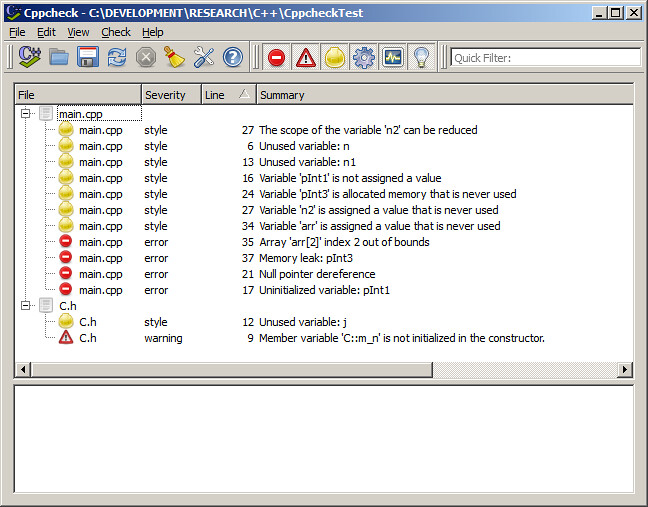
I want to show here how it looks in the practice. Let's say we have some smelly code:

C.h:

#ifndef _C_H_
#define _C_H_

class C
{
   // unitialized member
   int m_n;
public:
   C()
   {  
      // unused variable
      int j;
   }

   void Init(char ch)
   {
      // C-style pointer cast
      m_n = (int)ch;
   }
};
#endif // _C_H_


main.cpp:

#include "C.h"

// unused function
int foo()
{
   int n;
   return 0;
}

int main()
{
   // unused variable
   int n1; 

   // dereferencing unitialized pointer
   int* pInt1;
   *pInt1 = 1;

   // dereferencing NULL pointer
   int* pInt2 = 0;
   *pInt2 = 2;

   // memory leak - no delete
   int* pInt3 = new int(2);

   // scope of n2 is unecessarily main()
   int n2 = 0;

   {
      char ch = 2;
      n2 = (int)ch;
   }

   int arr[2];
   arr[2] = 3;

   return 0;
}


I played recently with Cppcheck and this is what it reports for the code above:

Cppcheck-report

Visual Studio prints code analysis messages in the Output window and for the code above it contains the following:

1>------ Build started: Project: CppcheckTest, Configuration: Debug Win32 ------
1>Build started 15/02/2012 19:49:12.
1>InitializeBuildStatus:
1> Touching "Debug\CppcheckTest.unsuccessfulbuild".
1>ClCompile:
1> main.cpp
1>c:\...\cppchecktest\c.h(12): warning C4101: 'j' : unreferenced local variable
1>c:\...\cppchecktest\main.cpp(6): warning C4101: 'n' : unreferenced local variable
1>c:\...\cppchecktest\main.cpp(13): warning C4101: 'n1' : unreferenced local variable
1>c:\...\cppchecktest\main.cpp(35): warning C6201: Index '2' is out of valid index range '0' to '1' for possibly stack allocated buffer 'arr'
1>c:\...\cppchecktest\main.cpp(17): warning C6001: Using uninitialized memory 'pInt1': Lines: 13, 16, 17
1>c:\...\cppchecktest\main.cpp(21): warning C6011: Dereferencing NULL pointer 'pInt2': Lines: 13, 16, 17, 20, 21
1>c:\...\cppchecktest\main.cpp(35): warning C6386: Buffer overrun: accessing 'arr', the writable size is '8' bytes, but '12' bytes might be written: Lines: 13, 16, 17, 20, 21, 24, 27, 30, 31, 34, 35
1>c:\...\cppchecktest\main.cpp(17): warning C4700: uninitialized local variable 'pInt1' used
1>ManifestResourceCompile:
1> All outputs are up-to-date.
1>Manifest:
1> All outputs are up-to-date.
1>LinkEmbedManifest:
1> All outputs are up-to-date.
1> CppcheckTest.vcxproj -> C:\...\CppcheckTest\Debug\CppcheckTest.exe
1>FinalizeBuildStatus:
1> Deleting file "Debug\CppcheckTest.unsuccessfulbuild".
1> Touching "Debug\CppcheckTest.lastbuildstate".
1>
1>Build succeeded.
1>
1>Time Elapsed 00:00:04.38
========== Build: 1 succeeded, 0 failed, 0 up-to-date, 0 skipped ==========


Links and References:
Analyzing Application Quality by Using Code Analysis Tools (MSDN)
How to: Enable and Disable Automatic Code Analysis for C/C++ (MSDN)
Cppcheck

Tuesday, 14 February 2012

XML Data Binding - Part 3: CodeSynthesis XSD example

In my previous article about XML Data Binding, I demonstrated how to use gSOAP in order to convert data from XML document into in-memory C++ objects and vice versa. Today I will show how to use another tool, CodeSynthesis XSD, to perform the same task.

CodeSynthesis XSD depends on Apache Xerces-C++ XML parser so you need to download and set up Xerces in your development environment first. Setup of both tools is described in README.txt file you can find after unpacking downloaded CodeSynthesis XSD archive.

In order to compare gSOAP and CodeSynthesis Data Binding process, let's create a project that does the same XML processing, like gSOAP one: loads XML, reads and displays data, adds new element, displays data again and saves chnages to XML.

We are going to use the same XML schema - library.xsd:


If XML documents use XML schema grammars Xerces parser requires them to specify location of their XML schemas (by using an xsi:schemaLocation attribute if they use namespaces, and an xsi:noNamespaceSchemaLocation if not).


NOTE: Make sure xml document and its schema are in the same directory (application's working directory).

Similar to gSOAP case, we need to compile schema into C++ classes. CodeSynthesis schema compiler is xsd.exe and can be found in the bin directory of the package (e.g. ..\xsd-3.3.0-i686-windows\bin\). This directory should be added to Path environment variable. We want to generate C++/Tree mapping and code for serialization (object to XML; this code is not generated by default) so call XSD compiler with following parameters:

c:\test\XercesCodeSynthesis_Test1>xsd cxx-tree --generate-serialization library.xsd

It creates two files, library.hxx and library.cxx, and we need to include them into our project as they contain definitions of proxy classes.

Again, like we had with gSOAP, CodeSynthesis XSD generates classes that match XML document elements, by name and structure. We can see that in the header, library.hxx (some parts are omitted):


Schema complier has generated and Library_ functions that serialize/deserialize data to/from XML file.

main.cpp contains code that loads XML document into Library object, traverses through its member (vector) Books and displays all Book elements; it then adds a new Book to the collection, displays it again and serializes back to XML document in file:


Output:


Displaying all books in the library:

Book:
Title:Clean Code
Author:Robert C. Martin
ISBN: 0132350882
Copies available: 2

Book:
Title:The Pragmatic Programmer
Author:Andrew Hunt
ISBN: 020161622X
Copies available: 0

Book:
Title:Design patterns
Author:Erich Gamma
ISBN: 0201633612
Copies available: 1


Adding a new book:
Title: Effective C++
Author: Scott Meyers
ISBN:0321334876
Copies available: 50


Displaying all books in the library:

Book:
Title:Clean Code
Author:Robert C. Martin
ISBN: 0132350882
Copies available: 2

Book:
Title:The Pragmatic Programmer
Author:Andrew Hunt
ISBN: 020161622X
Copies available: 0

Book:
Title:Design patterns
Author:Erich Gamma
ISBN: 0201633612
Copies available: 1

Book:
Title:Effective C++
Author:Scott Meyers
ISBN: 0321334876
Copies available: 50

library.xml is changed - a new Book element has been added:


Links and References:
Boris Kolpackov: An Introduction to XML Data Binding in C++